


Why Website Speed Is a Dealbreaker
Every second your website drags its feet, you’re losing money. A Google study showed that when load time jumps from 1 second to 3 seconds, the probability of a bounce increases by 32%. If your site takes 5 seconds? You could lose half your traffic before they even see your offer.
That’s where a CDN (Content Delivery Network) comes in. But what is a CDN and how can it improve your website? Let’s break it down.
What Is a CDN?
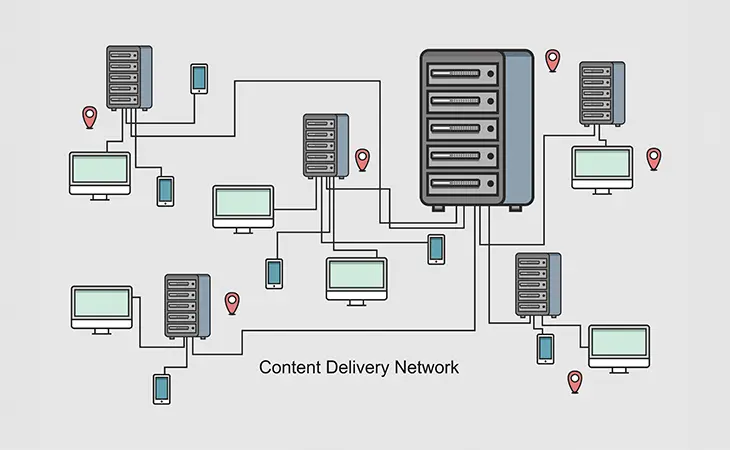
At its simplest, a CDN is a network of servers distributed across the globe that deliver your website content to visitors from the server closest to them.
Without a CDN:
- A visitor in California hits your server in Miami. That’s ~3,000 miles of latency.
With a CDN:
- That same visitor hits a server in Los Angeles, caching your site content locally. Result: faster load times, lower bounce rates, happier users.
What Does a CDN Actually Do?
-
Speeds Up Content Delivery
-
Images, CSS, and JavaScript files get cached and served from a nearby server.
-
This reduces latency and makes your site load faster everywhere.
-
-
Reduces Bandwidth Costs
-
Instead of your origin server handling every request, CDNs offload traffic. That saves you on hosting resources.
-
-
Boosts Security
-
Many CDNs (including Cloudflare) include DDoS protection, SSL support, and Web Application Firewalls (WAF).
-
-
Improves SEO
-
Google uses speed as a ranking factor. Faster websites rank higher and retain more visitors.
-
Real-World Example
One of our clients in Broward had a WordPress site with heavy images. Their New York traffic loaded fine (server was in Jersey), but West Coast visitors were waiting 6+ seconds. After installing Cloudflare, load times dropped under 2 seconds nationwide, and their lead conversions went up 18% in 30 days.
That’s not magic. That’s what a CDN does.
How to Install Cloudflare Free on Your Website
Cloudflare offers a solid free plan, perfect for small businesses. Here’s how to set it up step by step.
Step 1: Create an Account
-
Go to Cloudflare and create a free account.
Step 2: Add Your Site
-
Enter your website domain. Cloudflare will scan your DNS records.
Step 3: Update Nameservers
-
Cloudflare gives you two new nameservers. You’ll log into your domain registrar (GoDaddy, Namecheap, IONOS, etc.) and replace your current ones with Cloudflare’s.
Step 4: Configure Settings
-
Turn on “Always Use HTTPS.”
-
Enable Auto Minify (for CSS, JS, HTML).
-
Enable Brotli compression.
-
Set your caching level to “Standard.”
Step 5: Test Your Site
-
Use GTmetrix or Google’s PageSpeed Insights to benchmark before/after results.
Advanced Perks (For Free)
-
Free SSL: No need to buy SSL separately – Cloudflare provides one.
-
DDoS Protection: Your site gets a shield against common attack vectors.
-
Global Reach: Even if your host is budget-friendly, your site can load like an enterprise-level setup.
Final Thoughts
So, what is a CDN and how can it improve your website? In today’s world of expecting everything quickly, CDNs are a definite necessity. A CDN speeds up load times, strengthens security, and gives you a measurable SEO advantage. For small businesses running on WordPress, Cloudflare’s free plan is a no-brainer. It’s the simplest way to make your website feel fast, safe, and professional, without spending a dime.
Further Reading
For more inspiration and practical tips, check out these insightful articles:
- Rocket Web Designer – How to Improve Website Speed
- Rocket Web Designer – Why SSL, Accessibility & Mobile Performance Matter for SEO (And Customer Trust)
- Cloudflare – Getting Started With Cloudflare
- Google – Why Speed Matters for SEO
Web Design Services
We are to help answer any questions you might have regarding web design & marketing.
Schedule Consultation